Why Is My Temporary Email Address Rejected? Causes and Safe Alternatives
Understand why signup forms reject disposable email addresses, how domain reputation algorithms detect temporary inboxes, and safe, legitimate alternatives.
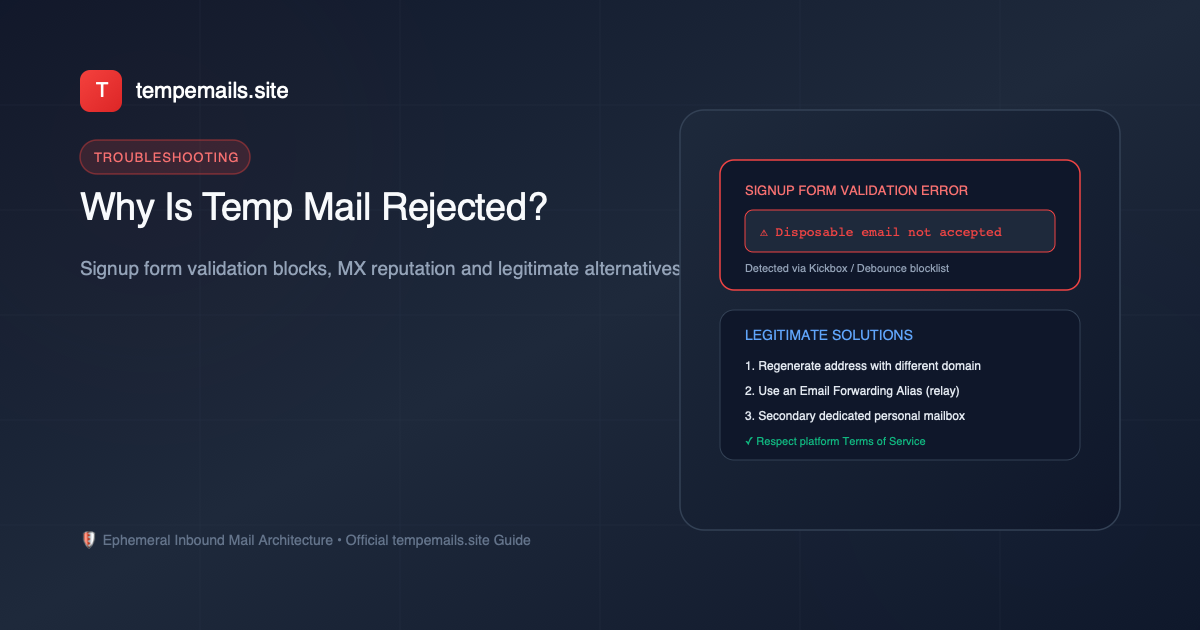
You find an interesting web application, click the signup button, and paste a freshly generated disposable email address to protect your personal privacy. But instead of seeing a welcoming confirmation screen, the form flashes a red error badge: "Disposable email addresses are not allowed" or "Please enter a valid work or personal email address."
Why does this happen? Is the email address broken, or is the website deliberately screening your inbox? In this technical guide, we break down why websites reject temporary email addresses, how modern email validation systems operate, the crucial difference between an address rejection and a delivery failure, and what legitimate, privacy-respecting alternatives you can use without violating platform terms.
Why Do Websites Reject Disposable Email Addresses?
Websites and SaaS platforms do not reject temporary emails out of malice; rather, automated screening is an intentional architectural decision driven by risk management, marketing objectives, and account security. The primary reasons include:
- Lead Generation and Customer Relationship Management (CRM): Many content creators, webinar hosts, and B2B platforms offer whitepapers, eBooks, and product demos specifically to capture valid sales leads. When a visitor signs up using an ephemeral inbox that expires in 7 days, the marketing team cannot nurture that contact or follow up on product interest.
- Fraud Prevention and Free-Trial Abuse: Cloud platforms, AI compute providers, and subscription software frequently offer free trial credits (such as compute hours or API tokens). Without domain filtering, automated bot scripts could generate hundreds of disposable accounts to harvest free quotas or execute denial-of-service tests.
- Account Security and Password Recovery: If a user creates a mission-critical account with a temporary email, they will lose access to password reset links once the inbox expires. To prevent customer support disputes from locked-out users, financial institutions, social networks, and enterprise tools mandate permanent mailboxes.
- Automated API Blocklists: Many web forms integrate third-party email verification APIs (such as Kickbox, ZeroBounce, Debounce, or Abstract API). These providers maintain real-time databases of thousands of known disposable mail domains and DNS MX records. When a submitted domain matches an entry on the blocklist, the form input instantly triggers a rejection event.
Address Rejection vs. Delivery Failure: A Vital Distinction
When troubleshooting signup friction, users often confuse two completely distinct technical occurrences:
| Diagnostic Dimension | Form Input Rejection | Email Delivery Failure |
|---|---|---|
| Where it occurs | Directly inside the web browser on form submission. | Between the sender's mail server and the receiving MX daemon. |
| User Experience | Form validation error blocks submission; no email is sent. | Form indicates "Email sent!", but the message never appears in inbox. |
| Root Cause | Domain name appears on a known disposable blocklist. | Outbound queue throttling, greylisting, or strict SPF/DKIM drops. |
| Correct Diagnostic Action | Use a legitimate email alias or secondary personal email. | Consult our OTP Troubleshooting Guide to diagnose mail delays. |
Step-by-Step Diagnostic Checklist
If you encounter friction when entering an address on a website, follow this diagnostic sequence:
-
Check for Syntax and Whitespace Errors: Ensure that no accidental leading or trailing spaces were copied alongside the email string (e.g.,
" user@tempemails.site"). - Inspect the Form Error Message: If the message explicitly mentions "disposable", "temporary", or "business email only", the domain is actively filtered by the platform's signup policy.
- Verify MX Availability: Open the tempemails.site generator and generate an alternate address from a fresh domain pool if available.
- Evaluate Account Importance: If the service is critical, requires two-factor backup, or handles financial data, disposable email is inherently unsuitable. Transition to an email alias or regular email account.
Safe and Legitimate Alternatives When Temp Mail Is Blocked
When a website legitimately requires an email that will survive beyond 7 days, you do not have to forfeit your privacy entirely. Consider these respectful, permanent solutions:
Email Forwarding Aliases
Services like SimpleLogin, DuckDuckGo Email Protection, and iCloud "Hide My Email" generate unique aliases that route incoming messages directly to your real inbox. If an alias begins receiving spam, you can deactivate it with a single click while preserving account recovery.
Dedicated Secondary Email Account
Maintain a secondary free Gmail or Outlook account dedicated entirely to subscriptions, forum interactions, and shopping. Keep your primary email reserved exclusively for financial, medical, and governmental matters.
Conclusion & Key Takeaways
Disposable email addresses on tempemails.site are ideal for fast, frictionless privacy defense when connecting to public Wi-Fi, downloading one-time resources, or exploring unvetted web services. However, when a platform has explicit business or anti-fraud policies that restrict disposable domains, respecting those boundaries and switching to an email alias or secondary permanent inbox is the responsible, sustainable approach.
Need a free disposable temporary email address?
Generate up to 5 concurrent inboxes with 1-click OTP extraction on tempemails.site.